

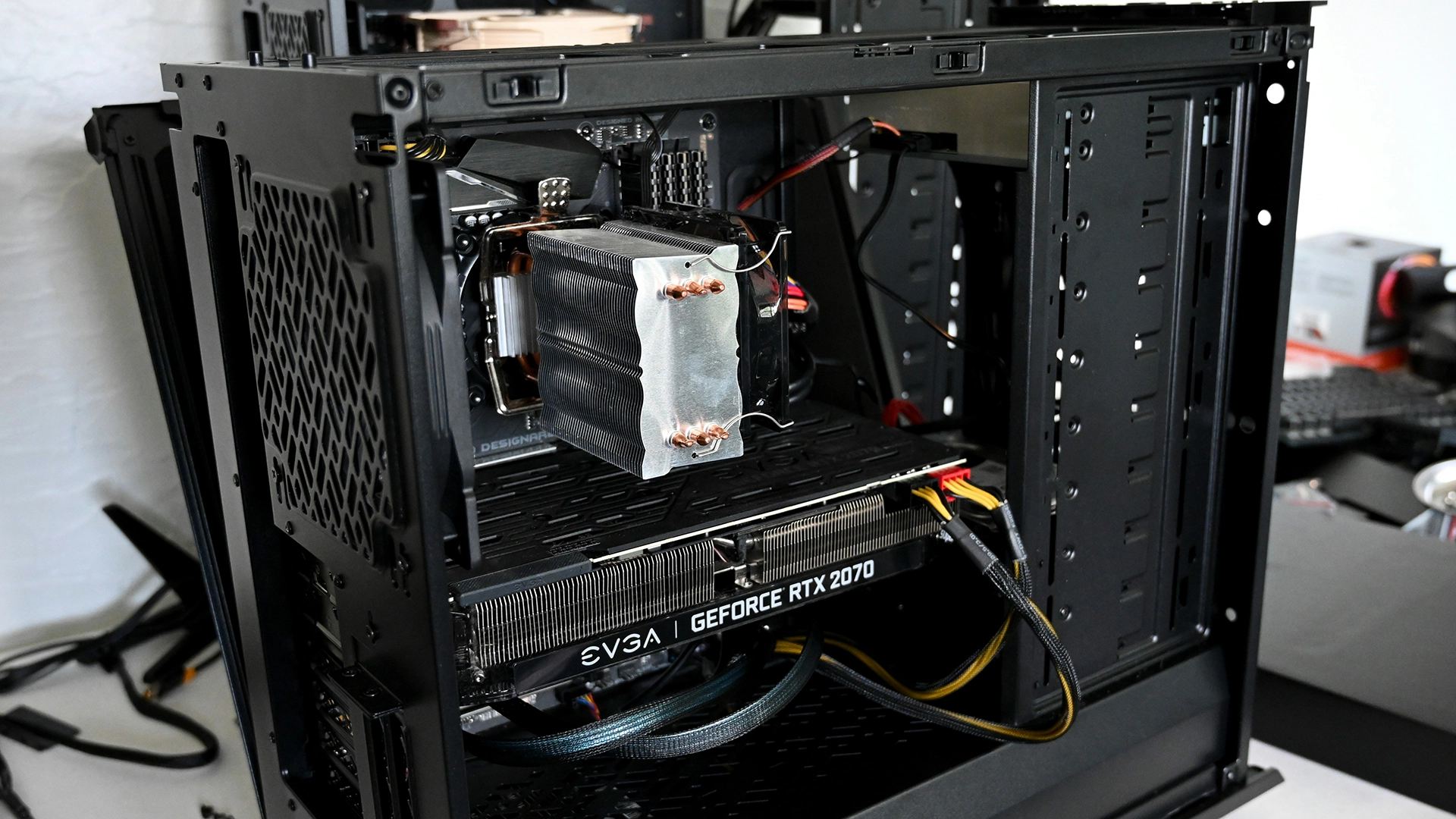
Minimum vs Recommended Hardware (With Real Part Examples + US Price Ranges)
Unreal Engine can run on surprisingly modest PCs, but developing comfortably is a different story. The editor will happily eat CPU time (shader compilation, C++ builds), RAM (large maps + tools), and storage (Derived Data Cache, intermediate files). Choosing the right workstation hardware isn’t about flexing specs, it’s about shortening iteration time and staying stable when your project grows.
This guide breaks down:
- Epic’s official baseline (what they publish)
- A true minimum that still makes sense in 2026
- A real recommended setup for serious UE work (including optimization-heavy workflows)
- US build cost ranges for each tier
What Epic officially says:
Epic’s UE5 documentation prominently lists Recommended Hardware:
- CPU: Quad-core Intel/AMD, 2.5 GHz+
- RAM: 32 GB
- GPU VRAM: 8 GB+
- GPU: DirectX 11/12 compatible (latest drivers recommended)
Epic also lists Minimum Software Requirements (OS + DirectX runtime), but they don’t provide a neat “minimum hardware” table the same way they do for recommended.
One more useful detail from Epic: if you compile from source or build often and don’t use Incredibuild, they recommend compiling on a machine with 12 to 16 CPU cores.
And if you care about modern UE5 rendering features, Epic states Lumen (GI/reflections/MegaLights) expects DirectX 12 + SM6 and a GPU family like NVIDIA RTX-2000 series or newer, AMD RX-6000 series or newer, or Intel Arc A-series or newer.
What we really think it is:
Tier 1: Epic’s official minimum
Epic’s minimum is really “minimum OS/software,” and their published hardware baseline is the Recommended Hardware list above.
If you want a concrete build that matches Epic’s baseline today, a realistic example is:
- CPU: Intel Core i5-12400F (6 cores / 12 threads)
- GPU: NVIDIA RTX 2060 (6GB) / RTX 3060 (12GB) / AMD RX 6600 XT (8GB)
- RAM: 32 GB
- Storage: 1 TB NVMe SSD
This tier is the “official safe answer” for most people starting UE5 work, because it aligns with Epic’s published baseline (32GB + 8GB+ VRAM).
Tier 2: Real world minimum
This is the lowest tier that can realistically support learning UE, basic prototypes, and small projects without being constant pain.
Example build (absolute minimum):
- CPU: AMD Ryzen 5 2600 / Intel Core i5-8400
- GPU: NVIDIA GTX 1060 6GB or GTX 1660 6GB, AMD RX 580 8GB
- RAM: 16 GB
- Storage: 500 GB SSD (NVMe preferred, but any SSD beats HDD)
This runs the editor, but you’ll need patience with shader compilation and big scene loads. If you’re using UE5 features aggressively (dense Nanite scenes, heavy Lumen use), you’ll hit limits faster.
Practical tip: If you’re on this tier, the most impactful upgrades are SSD → NVMe, then 16GB → 32GB RAM.
Tier 3: Epic’s official recommended
This is simply Epic’s documented recommended hardware, stated explicitly:
Quad-core CPU + 32GB RAM + 8GB+ VRAM.
A very literal “Epic recommended” build example:
- CPU: Intel Core i5-12400F or AMD Ryzen 5 5600
- GPU: NVIDIA RTX 3060 12GB (a common, very workable UE GPU)
- RAM: 32 GB
- Storage: 1 TB NVMe SSD
Tier 4: Real world recommended
This is where Unreal starts feeling consistently smooth for real production: bigger projects, heavier levels, more multitasking, faster builds.
Example build (balanced “recommended”):
- CPU: AMD Ryzen 7 7700 / 7800X3D or Intel Core i7-13700K / i7-14700K
- GPU: NVIDIA RTX 4070 / 4070 SUPER (12GB) or AMD RX 7800 XT (16GB)
- RAM: 64 GB
- Storage: 2 TB NVMe SSD (optionally a second NVMe for project + cache)
Why 64GB? Puget Systems’ rule of thumb: 32GB for most users, 64GB+ if you do RAM-intensive tasks like long lighting builds (and, in practice, large worlds + heavy multitasking).
Pricing: what each tier costs in the US
Hardware prices change weekly, especially GPUs. The best way to communicate price honestly is with ranges.
Tom’s Hardware maintains an updated “best PC builds” guide with budget tiers like $500, $800, $1,000, $1,500, $2,000+, useful as a sanity check for current market brackets.
Here are realistic UE development build ranges:
|
Tier |
What it’s good for |
Estimated cost (USD) |
|
Tier 2 (Absolute Minimum) |
Learning UE, small prototypes |
$450–$750 |
|
Tier 3 (Epic Recommended Baseline) |
Most indie work, solid general dev |
$900–$1,400 |
|
Tier 4 (Real Recommended) |
Larger projects, smoother iteration |
$1,600–$2,600 |
|
CPU-heavy “Build machine” |
Faster compiles/cooks (porting/outsourcing teams love this) |
$2,200–$4,000+ |
Why the top tier jumps: CPUs with lots of cores, more RAM, and extra NVMe storage add up fast, yet they can save real time. Epic explicitly calls out 12–16 cores as a good target for compiling if you don’t use Incredibuild.
Extra: What to prioritize (so you don’t overspend)
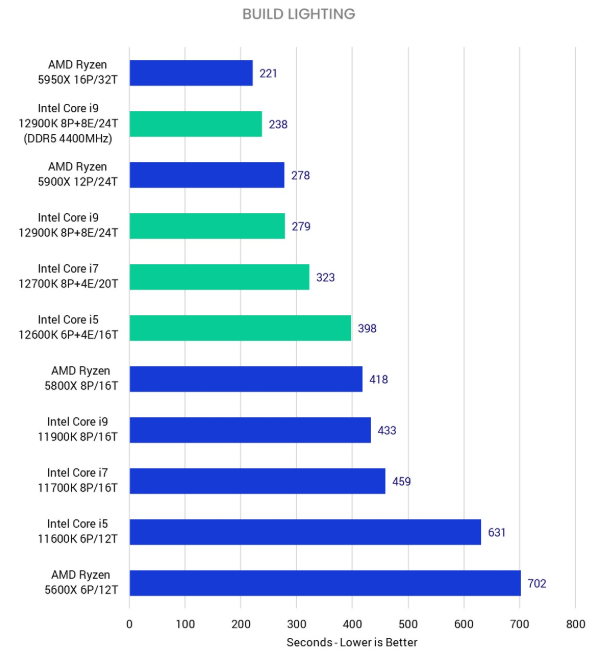
If you want the best “feel per dollar” in Unreal Engine development:
- NVMe SSD first (project + cache)
- 32GB RAM minimum (64GB if you’re serious or multitask heavily)
- CPU cores if you compile/cook/package often (or use source builds)
- GPU/VRAM if your scenes are heavy or you rely on Lumen/Nanite workflows